

The full-size avatar has glowing armor, fine fur, three background symbols, and a tiny scar that gives the character its personality. In the chat list, all of that becomes a dark circle with two bright dots. A friend looking for the account sees none of the detail that took the longest to choose. The image was designed as a poster and then asked to work as an icon.
An AI Photo Editor can help turn a source image into a different visual treatment, but an avatar needs to be judged where other players will actually encounter it. Start with the small silhouette. If that remains distinct, additional detail can enrich the larger view without carrying the entire identity.
PicEditor AI supports image upload, prompted modifications, and restyling. For an avatar, those tools provide a way to simplify or reinterpret a source while retaining the feature you want people to recognize. The selection should happen at both the full size and the smaller size used by the destination.
Choose One Feature That Can Survive The Circle
Consider a fictional fox character with pointed ears and a pale muzzle. Those shapes can remain legible after shrinking. A necklace, shoulder badge, and elaborate background may contribute to the character drawing, but they are weaker candidates for the feature that identifies the account in a crowded chat.
Decide which feature deserves priority before editing. It might be an unusual outline, a clear color division, or a simple prop beside the face. Avoid relying on several small features that only work when inspected together. An icon has little space for that kind of explanation.
Check how the destination crops the image. A circular display can cut off the fox’s ears even when the uploaded picture is square. Leave enough space around the defining shape and preview the crop before adding decoration. The exact dimensions should come from the destination’s current requirements rather than a generic avatar-size rule.
For a team or gaming group, compare the proposed icon with the other members’ images. A dark hooded face may look good alone and still be difficult to distinguish among several similar portraits. A different silhouette can be more useful than another variation of the same glowing-eye treatment.
Compare A Detailed Portrait With A Simpler Treatment
A detailed portrait rewards someone opening the profile. A flatter illustration can preserve the account’s identity in a smaller space. Neither is automatically the right choice. Compare them against the main place the image will appear, whether that is a chat list, a stream overlay, or a larger profile page.
Photo editor choices become clearer when the same source supplies both candidates. Ask for a simplified treatment without changing the chosen silhouette. Then compare that version with a more detailed one. Keep the pose and crop similar enough that you are judging the treatment rather than two entirely different characters.
Use PicEditor AI to describe the change in concrete terms: a clean outline, a plain background, and the pale muzzle kept distinct from the darker face. A request for an epic or professional avatar offers less help when the actual problem is a disappearing ear.
An AI Photo Editor can produce a striking large image while leaving the small version unresolved. Do not let the impressive preview settle the decision. Export or preview the candidate in the destination’s shape and inspect it at the size a teammate will see during an ordinary conversation.
Color can help separate the face from the background, but it should not be the only distinction. A clear light-dark boundary or recognizable outline gives the image another way to remain readable. Test a muted version if you are unsure whether the design depends entirely on a bright accent.
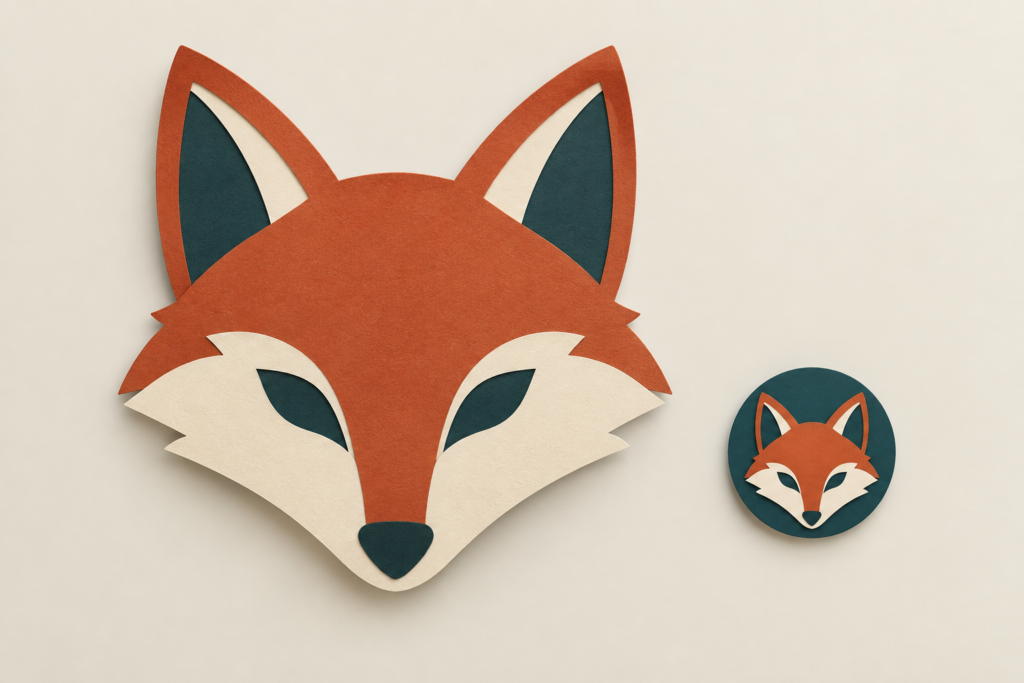
Shrink The Avatar Before Choosing Its Final Details
Place the candidates beside each other at a small viewing size without enlarging them. Ask which one can be identified quickly and which requires inspection. This is a practical design comparison, not a measured claim about recognition speed. The result should guide the next edit, not become an invented performance statistic.
For the fox, look at the ears first. If they merge into the background, simplify the surrounding shape or adjust the contrast. If the muzzle disappears, reduce competing texture around it. Name the feature that is failing instead of asking for more detail everywhere.
A Photo editor workflow is useful here when it supports a bounded revision from the chosen source. Keep the recognizable parts and change the distraction. Starting over with a new character at every attempt makes it harder to learn which design decision improved the icon.
Check the image in a row of other icons rather than on an empty canvas. A decorative ring may blend into the interface, while a busy background can make the central face seem smaller. The surrounding display changes what the viewer notices, even though the image file itself has not changed.
Then reopen the larger version. Simplification should not leave an awkward face or an unexplained shape that only works when tiny. The goal is an image that holds together at both sizes, with the small view determining which features cannot be sacrificed.
Keep Extra Decoration Away From The Identifying Shape
Once the icon works, add only details that leave its main feature intact. A subtle background texture may suit a profile page. A symbol placed behind an ear may make the outline less clear. Keep the decoration where it can disappear harmlessly when the image shrinks.
Do not use text inside the image to rescue weak recognition. A short name may be readable in a large banner and become a blur in the avatar. Let the platform display the account name separately while the image supplies its own visual cue.
If the same artwork will appear in a wider stream graphic, prepare that layout separately from the accepted source. A background that works for a banner may be too busy in an icon. The two uses can share a character without forcing every decorative element into both versions.
Save the accepted source and the final crop together. If the destination changes its display or you need a different size, you can return to the clear version rather than enlarging a small exported icon. Review the new output again instead of assuming the earlier crop still works.
A Familiar Outline Makes The Avatar Worth Keeping
PicEditor AI can help players explore an avatar treatment when they already know the feature they want to preserve. It is useful for comparing a detailed portrait with a simpler image, provided the final choice is made at the actual display size.
Choose the fox whose ears and muzzle remain distinct in the chat list. Keep the richer details for the larger view if they improve it. Before uploading, place the final crop beside the earlier icon in the same small preview. Keep it only if the defining shape remains as easy to identify.